Purchase & Licensing
Start with a free trial to evaluate the software before purchasing. To fully unlock TextExhibit Android App, complete its in-app purchase. The licenses below are for TextExhibit Desktop for iPhone Backups on Windows or Mac.
Mac compatibility: TextExhibit requires macOS 13 or later. Separate installers are available for Apple silicon (M1 or newer) and Intel Macs.
TextExhibit Android App License
The TextExhibit Android App uses a simple in-app purchase to unlock full functionality.


What the Android license includes:
- Unlimited exports of your personal conversations
- No watermarks on generated PDFs
- No redacted text messages — every message is rendered in full
- Perpetual license — pay once, no subscription or recurring charges, no time limits
- Personal use — licensed to one person for use on their own phones and tablets
To purchase, open TextExhibit Android App and use the in-app purchase option. The license is managed by Google Play and tied to your Google account.
Important: The Android license is a personal license. A single purchase may not be shared across an organization, used through a shared Google account, or used to export messages from clients’ or employees’ phones. See the Android Terms of Use. For business use, contact support@textexhibit.com.
Free Trial
TextExhibit starts in free trial mode with the following limitations:
- Watermarks are added to all generated PDFs
- Some text messages are redacted in the output
- Maximum of three exports (no limits on number of messages processed per export)
The trial allows you to fully evaluate TextExhibit’s features before purchasing. When you’re ready to generate production documents, purchase a license to remove all limitations.
TextExhibit Desktop for iPhone Backups License
Reads Finder backups on macOS and Apple Devices backups on Windows.
Pricing
$19.99 / one time
One personal iPhone, perpetual license, with unrestricted PDF and Excel exports.
$99.99 / year
Unlimited phones and exports for an active annual subscription.
$14.99 / month
Unlimited phones and exports for an active monthly subscription.
Choose a variant above to open checkout with that license already selected. All variants use TextExhibit Desktop for iPhone Backups on Windows or Mac.
What’s Included
- Full, unrestricted use of TextExhibit — no watermarks, no redacted messages
- All future updates included
- Bates numbering and hash verification reports
- 100% local processing — your data never leaves your computer
- Email support
License Terms
- Personal iPhone — Unlimited exports for a single personal iPhone. The license is tied to that iPhone rather than to a computer and may be activated on up to three computers for use with the licensed iPhone. Transferable to a new iPhone when you buy a new phone (limited to once every 6 months). One-time purchase, perpetual, no subscription or expiration.
- Annual & Monthly — Licensed per computer seat. A single-seat license covers one computer; a multi-seat license may be activated with the same Lemon Squeezy key on up to the number of computers purchased. Includes unlimited phones and exports (Android and iPhone) for the duration of your subscription.
Activating Your License
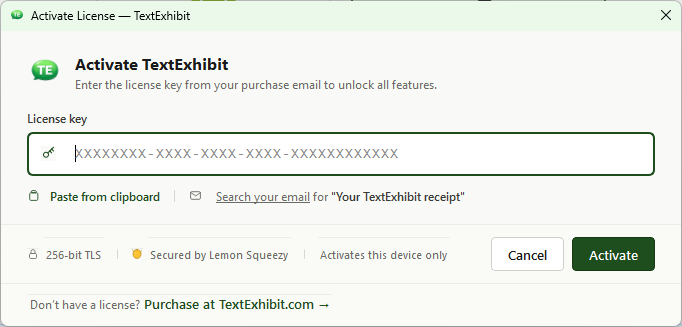
After purchasing, you will receive a license key via email. To activate:
- Open TextExhibit
- Go to Help > Activate License (or click the activation prompt)
- Copy your License Key from the Lemon Squeezy email, then click the “Paste from Clipboard” button — or enter it exactly as provided
- Click “Activate”
- TextExhibit will validate your license and unlock full functionality
License FAQ
What is your refund policy?
Please use the free trial before purchasing to confirm that TextExhibit can read your data and produce the output you need.
If a technical issue prevents TextExhibit from producing a usable export, please contact us within 14 days of purchase and give us an opportunity to help. If we cannot resolve the issue, we will refund your purchase.
We do not generally offer refunds because you changed your mind, no longer need TextExhibit, or successfully completed the task for which you purchased it.
Can I use one license on multiple computers?
Yes, if your license includes multiple seats. Use the same Lemon Squeezy license key to activate TextExhibit on up to the number of computers covered by your purchase.
The Personal iPhone license works differently: it is tied to one iPhone rather than one computer, and it may be activated on up to three computers for use with that licensed iPhone. A single-seat Annual or Monthly license covers one computer.
What if I get a new computer?
If all computer activations covered by your license are already in use, deactivate TextExhibit on the old computer by clicking Help > License Info > Deactivate License, then activate it on the new computer with the same key. You may also contact support and we’ll deactivate the old installation for you.
Volume Licensing
For law firms or organizations needing multiple licenses, please contact us for volume pricing.
Need Help?
- Contact Support for licensing questions
- View FAQ for common questions